Features / App information
How to find recently installed, updated and used Android apps
In App Info in the Dev Tools App, you can find recently installed or updated apps. The recent-use group tracks app switches observed after you enable the accessibility service.
1. Find an app in the list
Open App Info and search by display name or package. For preinstalled apps, turn on Show System App. You can switch between list and grid views. The installed-apps entry in device information opens Android’s app management screen.
2. Check the relevant dates
- 2.1Look for the recent install and update groups. For the exact dates, open Installation in the app details and check First Install Time and Last Upgrade Time.
- 2.2Installation Source can include the installer name and package. It can also read Unknown when the system supplies no installer.
- 2.3To populate recent use, enable the accessibility service and open two test apps. On returning to App Info, check the group for observed app switches since the service was enabled.
For one newly installed demo, both First Install Time and Last Upgrade Time read 2026-11-14 01:50:34. Its installation source was Unknown.
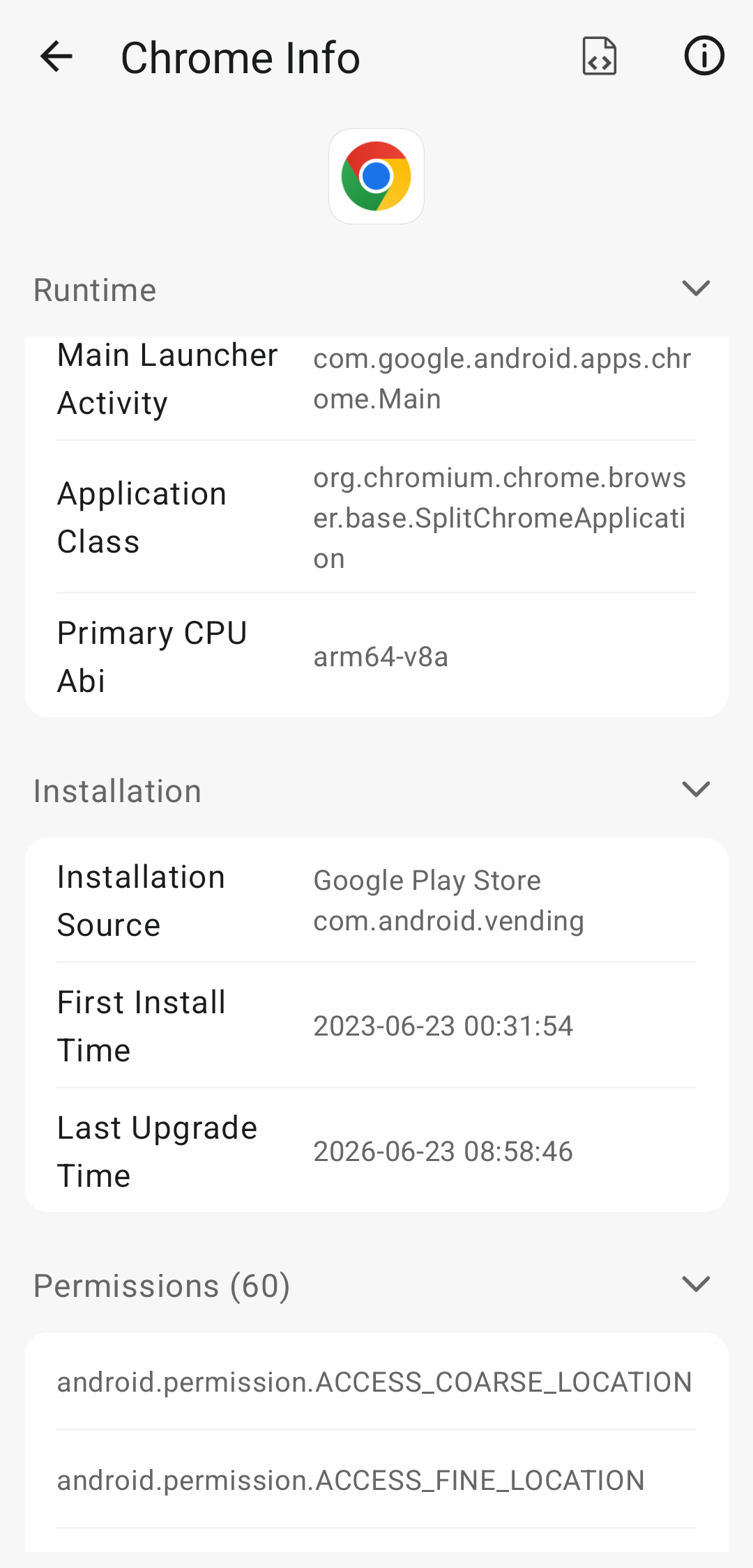
3. Check when a test patch arrived
If you installed a test build on Monday and updated it on Wednesday, Installation should show Monday as the first install and Wednesday as the last upgrade. Opening it again on Thursday can change the recent-use order. Check Last Upgrade Time and Version Code to confirm Wednesday’s patch.